
My Model Won't Learn: A Debugging Checklist
A step-by-step list for when the loss just sits there.

The loss is 2.30 at step 0. It is 2.30 at step 500. Nothing is crashing, nothing is warning you, the GPU is busy. The model is just not learning.
This is one of the most common problems in machine learning, and the cause is often outside the model architecture. Here is the order I check things in. Work top to bottom and stop when the loss moves.
Step 0: run the one test that splits the problem
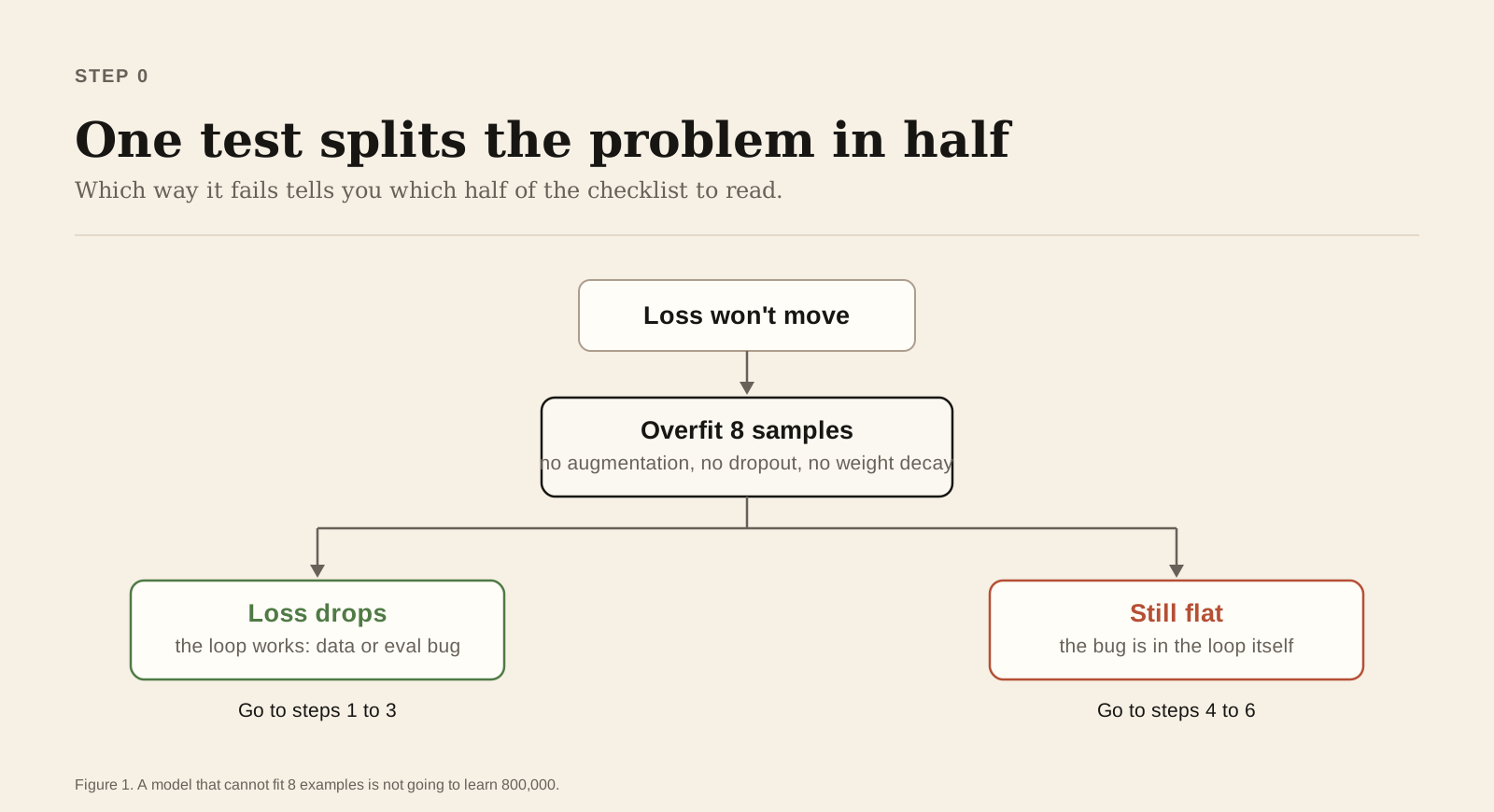
Take 8 samples. Turn off augmentation, dropout, and weight decay. Train on those same 8 samples for 200 steps.
tiny = [dataset[i] for i in range(8)]
# loop over `tiny` only, 200 steps
For a standard supervised task, the loss should usually fall close to zero. Noisy labels, leftover regularisation, and certain loss functions can stop it from getting all the way down, so what you are really watching for is a clear and steady drop. A model that cannot fit 8 examples is not going to learn 800,000.
This one test tells you which half of the checklist to read:
- The loss drops. Your training loop works. The bug is in your data or your evaluation. Go to steps 1 to 3.
- It stays flat. The bug is in the loop itself. Go to steps 4 to 6.
Step 1: look at your data with your own eyes
Shuffle bugs are silent. If you shuffle inputs and labels separately, every label points at the wrong sample, and the model learns nothing.
Also check the class balance. If 99% of your labels are one class, a flat loss may just be the model predicting that class, which is the right answer to the wrong question.
Step 2: check the labels match the inputs
Print x[0] and y[0] side by side and confirm by hand that the label is right. Do this for three samples. It takes a minute and it rules out an entire category of silent failure.
Step 3: check the loss function
Three cheap checks:
- Shapes. Does the loss expect
(batch, classes)or(batch,)? A silent broadcast will give you a number that means nothing. - Logits or probabilities?
CrossEntropyLosswants raw logits. If you put a softmax before it, you end up softmaxing twice, and the gradients get tiny. - The starting value. For balanced classification with cross-entropy loss and nearly uniform initial predictions, the starting loss is often close to ln(n). For ten classes, that is about 2.30. This rule does not carry over to regression or other loss functions, so if you are not doing cross-entropy classification, just record your first loss and compare it against a run you trust.
Step 4: move the learning rate in both directions
A flat loss is often just a learning rate problem, and both directions look the same from the outside.
Too small and the loss creeps so slowly it looks flat. Too large, and the model bounces off a wall that also looks flat, though you often see NaN a few steps later.
Try one value ten times higher than your current setting and one ten times lower. For many Adam-based experiments, 1e-2, 1e-3, 1e-4, and 1e-5 are useful starting checks, though the right range depends on your optimiser, batch size, and model. Once something moves, tune around it. Also check that your scheduler is not sitting in a warmup that never ends.
Step 5: check the gradients are actually flowing
Print the gradient norm of a few layers after loss.backward().
for name, p in model.named_parameters():
    if p.grad is None:
        print(name, "no grad")
    else:
print(name, p.grad.norm().item())- None: that parameter is not connected to the loss. Something was detached, or you built a new tensor instead of using the model's output.
- 0.0: the layer is frozen (
requires_grad=False) or dead. All-negative inputs into ReLU will do this. - Very large: may indicate exploding gradients. Check the learning rate and numerical stability first, then consider gradient clipping. Clipping straight away can hide the real cause.
- Fine at the last layer, near zero at the first: vanishing gradients. Add normalisation layers or residual connections.
Step 6: read the training loop line by line
The boring bugs live here, and everybody writes them at least once:
optimizer.zero_grad()is missing, so gradients pile up forever.optimizer.step()is never called, so nothing updates.loss.backward()called on a detached tensor.- The optimiser was built before you moved the model to the GPU, so it is updating a different copy of the weights.
model.eval()was left on during training, so dropout and batch normalisation are not behaving as intended.- The loop iterates over the wrong dataloader.
The fastest way to settle whether the loop updates anything at all is to look at a weight before and after one step:
before = model.layer.weight.detach().clone()
loss.backward()
optimizer.step()
after = model.layer.weight.detach()
print(torch.equal(before, after))
If this prints True, the parameters did not move, and the bug is somewhere in the six lines above.
Step 7: only now blame the model
If all of the above pass and the loss still does not move, then look at initialisation, saturated activations, missing normalisation, or an architecture that is genuinely too small for the task.
But that is step 7 for a reason. In my experience, nine times out of ten, the answer was in steps 1, 2, or 6.
The short version
- Overfit 8 samples. This splits the problem in half.
- Look at your data.
- Check labels match inputs.
- Check the loss shape and starting value.
- Move the learning rate up and down by a factor of 10.
- Print gradient norms.
- Reread the training loop, and confirm the weights actually change.
- Then, and only then, change the model.
Print this. Tape it near your desk. You will need it.
Want to share your own experience? Every member can write here: reach out and we'll help you publish your first post.