
Parsing PDFs Is Broken: How Docling and PixelRAG Are Fixing Unstructured Data
When your RAG system hallucinates numbers, the problem usually isn't the model. It's the ingestion pipeline.

If you have built a Retrieval-Augmented Generation (RAG) system for real-world enterprise documents, you have almost certainly hit the "PDF Wall."
You hook up your vector database, set up an LLM, write a clean system prompt, and test it, only to get back hallucinated numbers or confident errors. When you trace the issue back to the source, the problem isn't your LLM or your vector index. It's your ingestion pipeline.
The truth is, standard document parsing and traditional OCR are fundamentally broken for AI workflows.
Fortunately, two distinct paradigms have emerged to solve this: Docling [1], the layout-aware structural approach, and PixelRAG [2], the pixel-native visual approach. Here is a deep dive into why standard OCR fails and how these technologies are reshaping document intelligence.
1. The flaws of traditional OCR
PDFs were designed in the early 1990s as a digital replacement for printed paper (ISO 32000-1) [3]. They are essentially a collection of drawing instructions specifying where to render vector lines and text glyphs on a coordinate plane. They were never meant to store structured semantic data.
When standard OCR engines (like traditional Tesseract) or naive PDF text-extractors process a document, they make critical assumptions that break down on complex files:
- Shredded tabular data. Traditional OCR reads left-to-right, top-to-bottom across the physical bounding box. When it encounters a multi-column grid of data, it merges adjacent cells across columns into a single scrambled line. Row and column relationships vanish.
- Loss of spatial and visual context. Headers, sidebars, font weights, and parent-child visual hierarchies get flattened into plain unformatted string chunks [4]. The LLM receives the raw words, but completely loses where those words lived on the page and what they modified.
- Visual blindness. Infographics, flowcharts, architectural schematics, and line graphs are either completely ignored or dumped as useless character noise.
- Garbage in, garbage out. If your text extractor turns a 3x3 financial grid into a single jumbled sentence, no amount of prompt engineering will stop your LLM from hallucinating.
2. Approach A: Docling, precision layout parsing
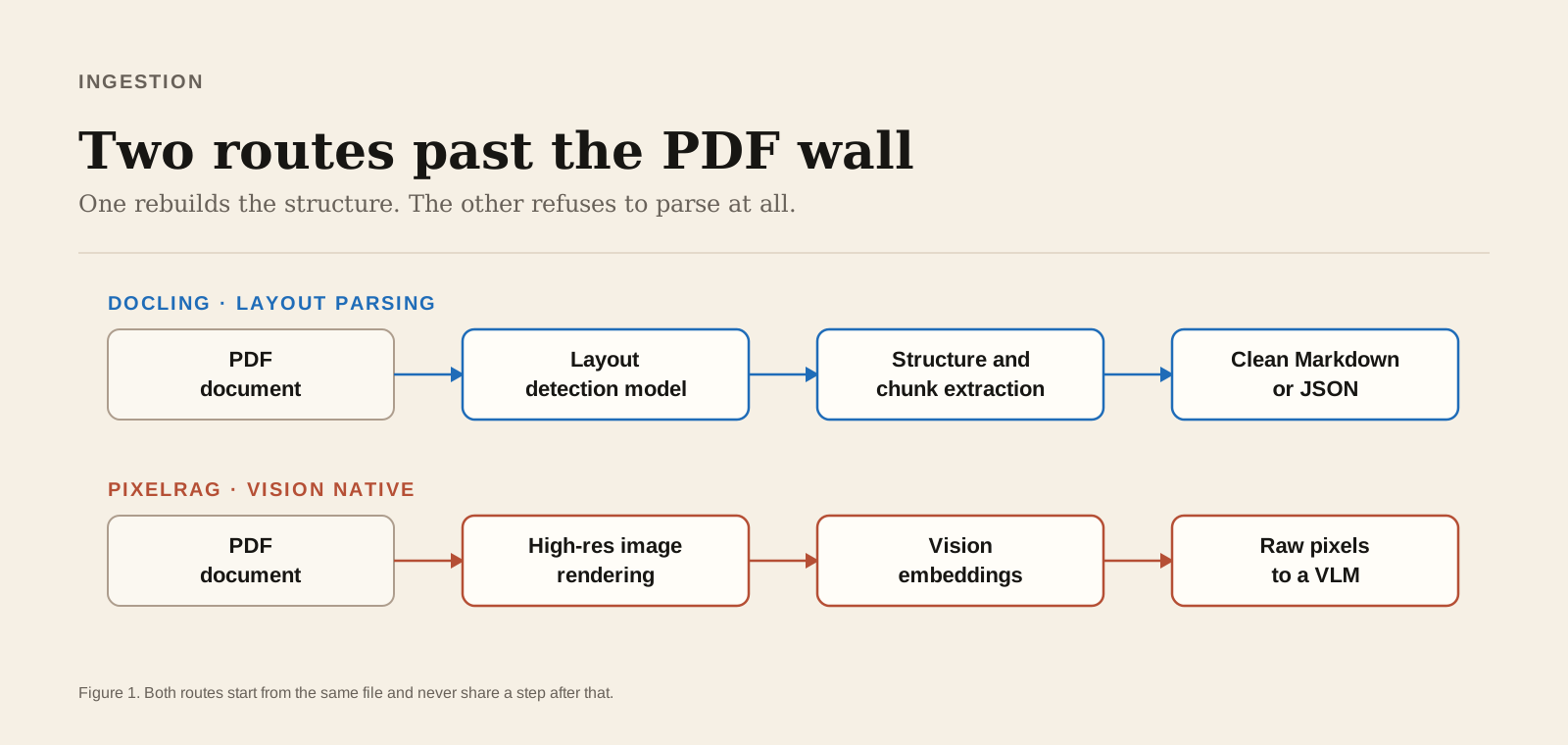
Developed by IBM Research, Docling [1] takes the structural route. Instead of treating a document as an unstructured stream of characters, Docling treats it as a complex visual layout that needs to be reconstructed into clean, semantically rich Markdown or JSON.
How it works
- Layout detection. Uses lightweight computer vision models (such as DocLayNet-trained architectures) [4] to identify bounding boxes for headers, footers, paragraphs, captions, and sidebars before touching the text.
- Tabular structure recognition. Specialized OCR and transformer models analyze tabular boundaries, mapping complex merged cells back into structured Markdown or HTML.
- Unified output processing. It outputs clean, unified Markdown that preserves the true reading order, allowing standard text splitters and vector engines to chunk document sections accurately.
Why it shines
- Token-efficient. Outputs pure text and Markdown formatting, keeping downstream LLM context window usage and API costs low.
- Seamless vector search. Integrates smoothly into traditional text-embedding indexes (Pgvector, Milvus, Qdrant).
- Programmatic utility. Ideal if you need to extract actual values into a relational database or structured JSON schema.
3. Approach B: PixelRAG, vision-native retrieval
PixelRAG (often powered by vision-native frameworks like ColPali [2]) takes a radical shortcut: stop trying to parse text at all.
Instead of wrestling with OCR errors, reading orders, and structure extraction, PixelRAG converts document pages directly into high-resolution image patches, indexes those images using vision-language embeddings (such as ColPali or Visualized BGE), and passes raw page images straight to a Vision-Language Model (VLM).
How it works
- Page rendering. Converts PDF pages or sections into high-density screenshot tiles.
- Visual embedding. Generates multi-vector embeddings (like PaliGemma-based patch representations) based on the physical appearance of the page rather than just text tokens [2].
- Multimodal generation. The retrieved page image is sent directly to a VLM, allowing the model to "see" the page just as a human eye would.
Why it shines
- Zero parsing pipeline overhead. Completely eliminates fragile parser, OCR, and chunking steps.
- Preserves 100% visual context. Charts, brand diagrams, architectural blueprints, complex infographics, and multi-line equations are preserved naturally.
- Resilient to weird formatting. Handles scanned pages, rotated text, non-standard fonts, and complex visual art layouts effortlessly.
4. Head to head
| Feature | Traditional OCR | Docling [1] | PixelRAG [2] |
|---|---|---|---|
| Multi-column layouts | Scrambles text order | Preserves logical reading order | Preserves layout visually |
| Complex tabular data | Destroys row and column structure | Reconstructs to Markdown or HTML | Reads visually as an image |
| Charts and diagrams | Ignored or lost | Extracts captions only | Analyzes trends and visuals directly |
| Context token cost | Low | Low, text-only tokens | Higher, vision tokens |
| Downstream search | Standard keyword or text vector | Hybrid BM25 plus text vector | Visual vector or multimodal |
| Best used for | Plain, unformatted documents | Financial reports, contracts, forms | Slide decks, schematics, infographics |
5. The verdict: which one should you pick?
The choice between Docling and PixelRAG comes down to the nature of your documents and your latency and cost constraints:
Choose Docling if you are working primarily with text-heavy PDFs, contracts, dense financial balance sheets, or documents where you need to extract explicit tabular values into structured data stores at low API cost.
Choose PixelRAG if your documents rely heavily on layout context, such as slide decks, user manuals with visual diagrams, engineering schematics, or multi-page infographics where losing visual layout means losing meaning.
The hybrid future. The most robust enterprise systems are adopting a hybrid pipeline, using Docling as the primary ingestion layer for low-cost, fast text retrieval, with a visual PixelRAG fallback triggered whenever complex visual elements or dense charts are flagged.
References
- Livathinos, N., Berther, L., Staar, P., et al. (2024). Docling: Efficient, Open-Source Document Parsing and Processing for AI Workflows. IBM Research Technical Report. github.com/DS4SD/docling
- Févry, T., Moryossef, A., et al. (2024). ColPali: Efficient Document Retrieval with Vision Language Models. arXiv:2407.01449
- International Organization for Standardization. (2008). Document management, Portable document format, Part 1: PDF 1.7 (ISO Standard No. 32000-1:2008).
- Pfitzmann, B., Auer, C., Dolfi, M., et al. (2022). DocLayNet: A Large RGB Dataset for Document Layout Analysis. Proceedings of the ACM SIGKDD Conference on Knowledge Discovery and Data Mining (KDD).
Want to share your own experience? Every member can write here: reach out and we'll help you publish your first post.